Guides › About & updates
Guide
About, updates and support
Updated 6 October 2026 · Quickey 1.10 (build 16)
The About page tells you which version you run, checks for updates and gives you the details to include when something goes wrong.
The About page
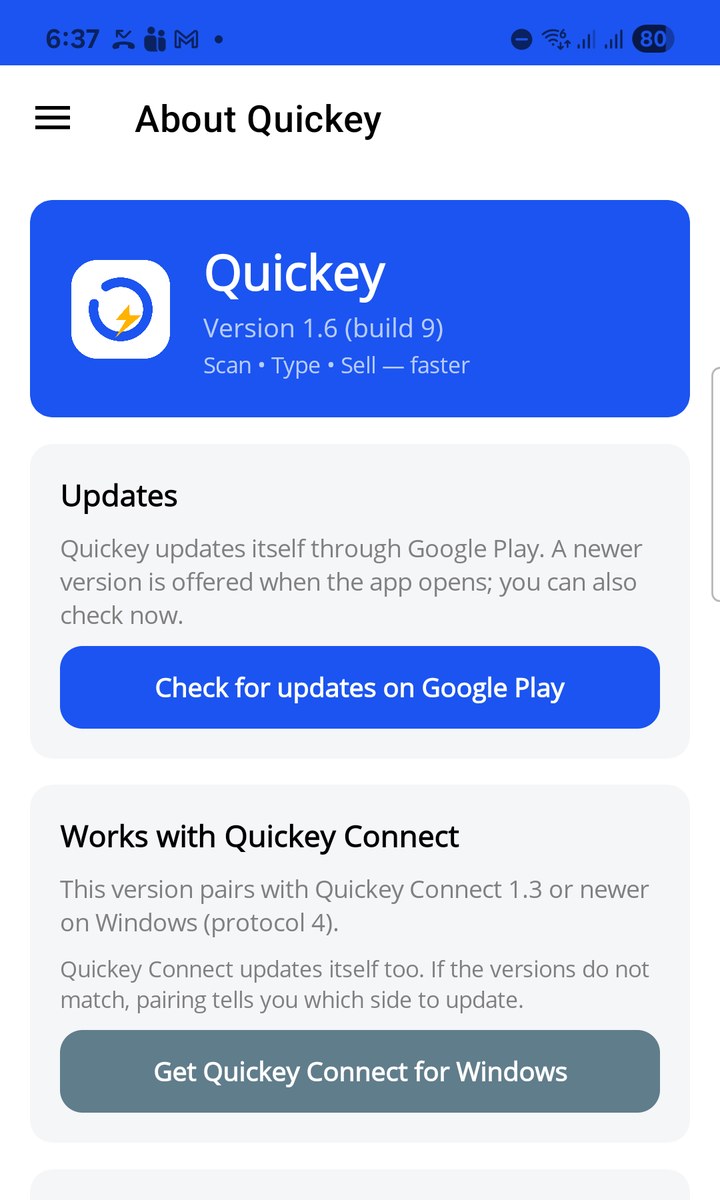
☰ › About shows the version and build number under the logo.
- Updates: Quickey updates itself through Google Play. A newer version is offered when the app opens; Check for updates on Google Play opens the store page so you can update now.
- Works with Quickey Connect: Quickey Connect updates itself too. If the versions do not match, pairing tells you which side to update. Get Quickey Connect for Windows opens the download page.
- Support details: app version, protocol version, phone model and Android version. Tap Copy details and paste them into your message when you report a problem.
- Links to the website, privacy policy, terms of service and the explanation of how Quickey uses the Accessibility service.
Reporting a problem
- Open About and tap Copy details.
- Write what you did, what you expected and what happened instead. Add a screenshot if you can.
- Send it through the support link on quickey.biz. Paste the copied details at the end.
During testing, please also note the build number (for example 1.10.0 (build 16)) so we can match it with the release you have.