Guides › Remote (keyboard & mouse)
Guide
Remote: keyboard, touchpad and air mouse
Updated 6 October 2026 · Quickey 1.10 (build 16)
Once the phone is paired with a PC or Android TV, the Remote page turns it into a full keyboard, a touchpad and a tilt-to-move air mouse.
Using the Remote page
Remote works over the Bluetooth keyboard link only: in Connect tap Bluetooth › Keyboard. Wi-Fi and internet pairing carry scans, not mouse movement. Then open ☰ › Remote.
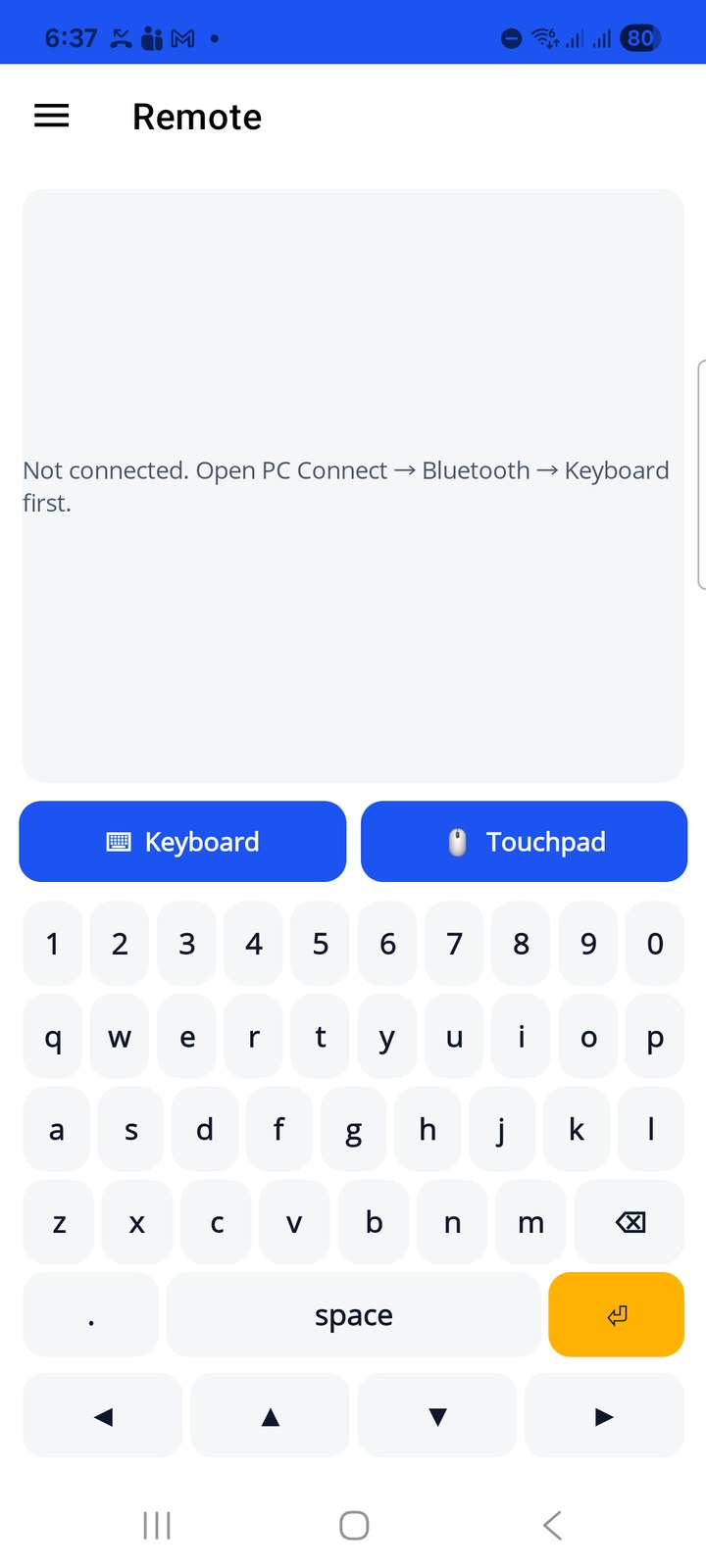
- ⌨ Keyboard (default): a number row, letters, backspace, space, Enter and an arrow row for TV navigation. Everything is sent as real key presses, so it works in any app on the PC or in the TV's search box.
- 🖱 Touchpad: one finger moves the pointer, tap to click, two fingers scroll. Left click and Right click buttons sit below the pad.
- Air mouse (tilt to move): a switch under the touchpad. Hold the phone like a remote and tilt it to move the pointer across a TV screen. It needs a gyroscope; phones without one show No gyroscope on this phone.
The status line at the top tells you if nothing is connected: Not connected. Open PC Connect › Bluetooth › Keyboard first.